
Linking Entertainment Systems with Automation (TV, Sound) Made Easy
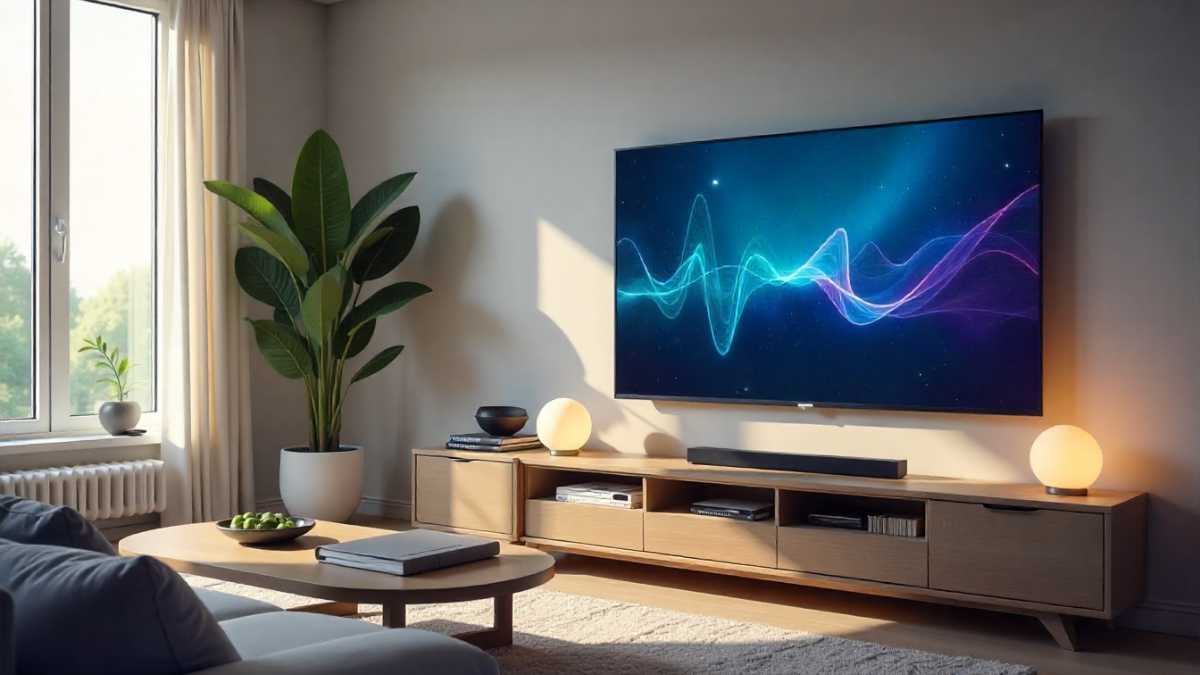
Picture this: you’re settling in for a movie night. With a single voice command, the lights dim, the curtains close, your TV turns on, and the sound system cranks up to the perfect volume. Sounds dreamy, right?
That seamless experience is exactly what you get when you start linking entertainment systems with automation.
This post explores how to set up your home for maximum entertainment and enjoyment. We’ll examine all the components needed and walk through the steps, helping you transform your living room into a smart entertainment hub.
Get ready to experience the future of entertainment! You’ll gain practical knowledge and tips to make your setup a reality, drastically improving your viewing experience and potentially increasing the value of your home.
Key Takeaways
Understanding Home Automation and Entertainment
Home automation is the technology that lets you control devices around your house with minimal effort.
This includes everything from lights and thermostats to security systems and, of course, your TV and sound.
Entertainment automation brings this control to your viewing and listening experiences, letting you create customized scenes and automations.
Think of it as creating “recipes” for your home entertainment, so everything works together perfectly. This makes enjoying your favorite shows and movies easier and more enjoyable.
What Is Home Automation?
Home automation uses technology to control and monitor a wide range of devices within a home, all from a central control system.
You can manage lights, temperature, security, and, importantly, your entertainment systems, such as TVs and sound systems.
This system can involve a hub (a central processing unit), smart devices (like smart speakers or smart plugs), and a user interface (such as a smartphone app or voice commands).
The goal is to make your home more convenient, efficient, and secure. For example, a home automation system might automatically lower the blinds and dim the lights when you turn on the TV for a movie night.
- Central Hub: A central point that connects all the smart devices in your home. It’s like the brain of your home automation system.
The central hub is the command center of a home automation network, responsible for receiving, processing, and sending commands to various smart devices.
The hub enables devices that wouldn’t normally communicate to interact, integrating everything together.
Popular options include smart speakers like Amazon Echo or Google Nest, or dedicated home automation hubs like Samsung SmartThings or Hubitat.
- Smart Devices: Individual devices that you can control. These can range from light bulbs to thermostats and entertainment systems.
These are the individual components that make up a home automation system. These devices are equipped with sensors, connectivity (like Wi-Fi or Bluetooth), and software that allows them to communicate with the central hub. Examples include smart TVs, smart speakers, smart plugs, smart lighting, and smart thermostats.
- User Interface: The way you interact with the system, such as a smartphone app, voice commands, or a touchscreen.
The user interface provides a way for you to control and monitor your smart devices. This is where you issue commands, create automation routines, and check the status of your devices.
Common user interfaces include smartphone apps (like the Amazon Alexa or Google Home app), voice assistants (like Alexa or Google Assistant), and dedicated touchscreens installed in your home.
The Role of Entertainment Automation
Entertainment automation takes home automation and focuses it on creating the ideal viewing and listening experience.
It involves integrating your TV, sound system, and other entertainment devices, so you can control them effortlessly.
For instance, when you start playing a movie, your automation system can automatically lower the lights, close the curtains, and adjust the volume. This provides a more immersive and convenient experience.
Many of the smart devices you’ll use are also designed to be integrated into home automation systems, which can simplify setting up and managing your smart home.
- Enhanced Convenience: Control everything with a single command or automated setting.
Instead of manually adjusting several devices every time you want to enjoy some entertainment, automation lets you do it all at once. This significantly reduces the time and effort needed to set up your viewing experience.
- Personalized Experiences: Create customized scenes and settings.
Tailor your entertainment setup to your specific preferences. For example, you can create a “movie night” scene that automatically dims the lights, closes the blinds, and turns on your TV and sound system at the perfect volume and lighting levels.
- Improved Enjoyment: Immersive and seamless experiences.
By automating the various elements of your entertainment system, you can eliminate distractions and focus on what matters most: enjoying your content. The perfect lighting, sound, and comfort settings can significantly improve your overall viewing experience.
Choosing the Right Components for Your Setup
To successfully integrate your entertainment systems with automation, it’s important to select the right components.
This process involves evaluating your needs, budget, and the features you desire. Different systems offer varying levels of functionality and compatibility. Researching the best options will ensure your home entertainment system performs well.
Smart TVs and Projectors
A smart TV or projector is a great starting point for home entertainment automation. They come with built-in features that can connect to other smart devices and integrate with home automation systems.
These TVs can have features such as voice control, app support (Netflix, Hulu, etc.), and compatibility with smart home platforms.
You’ll want to consider screen size, resolution, and the smart features they offer when selecting your devices. If you are starting from scratch, a projector will give you a large display, while a smart TV is simple to set up.
- Compatibility: Does the TV/projector work with your chosen smart home platform (e.g., Apple HomeKit, Amazon Alexa, Google Assistant)?
Check the compatibility of the TV or projector with the smart home platform you intend to use. This integration ensures seamless operation. Make sure your devices will connect to your chosen hub, allowing for control through voice commands or app-based automation.
- Resolution and Features: What resolution (4K, 8K) and features (HDR, OLED) do you need?
Choose a display that suits your viewing habits and budget. Higher resolutions provide better picture quality, while features such as HDR and OLED can enhance the visual experience, providing greater contrast and vibrant colors.
- Smart TV Platform: Consider the operating system (e.g., Tizen, webOS, Roku TV) and app support.
The operating system of the TV determines the user interface, available apps, and overall user experience. Consider the user experience and app library. Some platforms, like Roku TV, have a very user-friendly interface.
Sound Systems and Speakers
Your sound system is a key part of your home entertainment experience. Smart speakers and soundbars can integrate directly with automation systems and offer a range of features.
Look for systems that are compatible with your chosen smart home platform, support voice control, and offer high-quality audio.
Consider the size of your room and your desired sound experience when selecting a sound system. A soundbar is a compact option, while a multi-speaker setup can provide a more immersive experience.
- Speaker Type: Soundbars, surround sound systems, or smart speakers?
Choose the speaker type that best fits your needs and space. Soundbars provide a simple, all-in-one solution, while surround sound systems offer a more immersive audio experience. Smart speakers can integrate directly with voice assistants for hands-free control.
- Connectivity: Wi-Fi, Bluetooth, HDMI ARC/eARC.
Check the connectivity options available. Wi-Fi and Bluetooth allow for wireless streaming and control, while HDMI ARC/eARC simplifies the connection to your TV and supports high-quality audio formats. Ensure all components are compatible.
- Voice Control: Is it compatible with your smart home platform?
Verify that your sound system is compatible with your preferred voice assistant (Alexa, Google Assistant, etc.).
This makes controlling your audio system easier through voice commands, for example, adjusting the volume or skipping tracks.
Other Smart Devices for Home Entertainment
In addition to TVs and sound systems, a range of other smart devices can enhance your entertainment setup. Smart lighting allows you to create customized scenes and set the mood for watching movies.
Smart curtains or blinds can automatically close to reduce glare and improve the viewing experience.
Universal remotes can control all your devices from a single interface. These elements work together to provide complete control over your entertainment setting.
- Smart Lighting: Smart bulbs, light strips, and dimmers.
Smart lighting can be used to set the mood, and the lighting levels will automatically change for different activities.
This can include dimming the lights for movie night, or creating bright lighting for gaming. Smart lighting integrates seamlessly with home automation systems, for example, lowering the lights when the TV turns on.
- Smart Curtains/Blinds: Automate window coverings.
Smart curtains and blinds automatically open and close, adding convenience and improving the viewing experience by reducing glare and blocking out light. These can be scheduled to open and close at specific times, or triggered by events such as a movie starting.
- Universal Remotes: Consolidate multiple remotes into one.
Universal remotes consolidate multiple remotes into a single device, simplifying control of your entertainment systems.
These can often be integrated with smart home systems, allowing voice control and automation. The convenience of a universal remote is great for family members not familiar with smart systems.
Setting Up Your Entertainment Automation System
With your devices selected, the setup process can begin. This includes connecting your devices, setting up your smart home hub, and creating automation routines.
The exact steps can vary depending on the devices and systems you choose, but the general process remains similar.
Careful planning, proper wiring, and following manufacturer instructions will ensure a successful setup, giving you a simplified entertainment system.
Connecting Your Devices
The first step is connecting all your entertainment devices. This involves physically connecting your TV, sound system, and any other devices, like a Blu-ray player or game console.
Make sure the connections are secure and in the correct ports, such as HDMI for video and audio. Once the hardware is connected, you can move on to setting up your smart home hub and other software to get everything working together. Carefully organize your cables, and label them for ease of troubleshooting.
- Wiring: Proper HDMI, audio cables.
Ensure that all of your devices are properly wired to the TV and sound system using the appropriate cables.
HDMI cables are essential for high-quality video and audio, so use them to connect your Blu-ray player, gaming consoles, and other devices. For audio, choose the right cable.
- Power: Ensure all devices are plugged in and powered on.
Make sure all your devices have power. Check that all devices are properly plugged into a power source and turned on.
Ensure that the power outlets are working, and consider using a surge protector to protect your equipment.
- Network: Connect devices to your home network via Wi-Fi or Ethernet.
Connect your smart TV, sound system, and other devices to your home network. Use Wi-Fi or Ethernet for a stable internet connection for each device.
This connection is essential for accessing streaming services, receiving software updates, and integrating with your smart home system.
Setting Up Your Smart Home Hub
The smart home hub is the core of your automation system. This is where you’ll connect all your smart devices and manage your automations. Installing the hub depends on the type you’ve chosen (e.g., smart speaker, dedicated hub).
Once the hub is set up, you’ll need to connect your entertainment devices to it, so they can communicate with each other.
This process involves the hub discovering and recognizing your devices, after which you can begin to create customized scenes and automations.
- Hub Selection: Choose a compatible smart home hub.
Select a smart home hub that is compatible with your smart TV, sound system, and other devices. Consider the platform you prefer, such as Amazon Alexa, Google Assistant, or Apple HomeKit. Research hub compatibility before purchase.
- Device Pairing: Connect your TV and sound system to the hub.
Follow the instructions to pair your devices with the hub. This may involve using the hub’s app or user interface to discover and add your TV, sound system, and other smart devices.
Make sure your devices are close enough to be found and that you have the correct network and account credentials.
- App Installation: Install and set up the hub’s mobile app.
Download and install the mobile app associated with your smart home hub. You’ll use this app to control your devices, set up automations, and manage your smart home settings. It is necessary for controlling your system and custom settings.
Creating Automation Routines
Once your devices and hub are set up, you can start creating automation routines. These are the “rules” that tell your devices what to do. You can create scenes, which are pre-set configurations for specific activities, like “movie night.”
You can also set up more complex routines based on triggers, such as a command to turn on the TV.
Experiment with different settings to customize your experience and automate as much as possible, for maximum convenience. These settings give you full control of your entertainment system.
- Scene Creation: Set up “movie night,” “gaming,” and “listening” scenes.
Create scenes that automatically adjust your devices for different activities. For example, a “movie night” scene can dim the lights, close the curtains, and turn on the TV and sound system.
These scenes are designed to quickly and effortlessly switch to a desired entertainment experience.
- Voice Commands: Set up voice commands for control.
Use your smart home hub to set up voice commands. For example, you can say, “Alexa, start movie night,” and the hub will execute the scene you created. Voice commands make controlling your devices simpler and more intuitive.
- Automated Triggers: Automate actions based on time, location, or device status.
Set up automated triggers to start scenes or control devices based on time, location, or device status. For example, you can set the TV to turn on at a specific time, or automatically close the blinds at sunset. This makes your system more efficient.
Troubleshooting Common Problems
Even with careful planning, you might encounter issues during setup or use. Here are some of the most common problems and how to solve them.
Troubleshooting often involves checking connections, ensuring devices are on the same network, and verifying your hub settings. The right troubleshooting steps will make your system work smoothly, so you can start enjoying it.
Connectivity Issues
Connectivity issues are common in home automation systems. These can cause interruptions in device control and automation.
The first thing is to check your Wi-Fi and power connections and make sure that all devices are connected to the same network.
Consider restarting your devices or the hub to resolve connectivity issues. If problems continue, consider a mesh network or extender to improve Wi-Fi signal.
- Wi-Fi Problems: Devices not connecting to your network.
When devices won’t connect, you’ll need to troubleshoot your Wi-Fi network. Make sure your devices are within range and connected to the right Wi-Fi network.
Reboot your router and smart home hub and then check the network settings on each device to ensure they are correct.
- Device Unresponsiveness: Devices not responding to commands.
If your devices are not responding to commands, check that they are powered on, connected to the hub, and accessible.
If possible, try restarting the individual devices or the hub. You might need to troubleshoot through your hub’s app.
- Interference: Radio interference affecting performance.
Interference from other electronic devices can sometimes disrupt the communication of your smart home devices.
Keep your devices away from microwaves, Bluetooth devices, and other sources of radio interference. You can also try changing the channel on your Wi-Fi router to avoid conflict.
Compatibility Issues
Compatibility issues can occur if your devices don’t communicate with each other. This is often due to different standards or protocols.
Make sure your devices are compatible with your chosen smart home platform and hub. Double-check device compatibility by reading the manufacturer’s specifications.
If you’re unsure, consult online resources or contact the manufacturers for support. Careful consideration will make the installation process easier and more successful.
- Platform Incompatibilities: Devices not working with your chosen hub.
Always verify the compatibility of your devices with your smart home hub. Check the product specifications and read reviews to ensure they will work.
If they are incompatible, you may need a different hub or device. You might consider using a third-party app.
- Protocol Conflicts: Devices using different communication protocols.
Sometimes, devices may use different communication protocols, which can cause them to not communicate with each other.
Look for devices that support common protocols. Consider upgrading to the newest version, as older versions can encounter compatibility issues.
- Firmware Updates: Outdated firmware causing issues.
Outdated firmware can cause compatibility issues and performance problems. Keep your devices up-to-date with the latest firmware updates. Install updates through the smart home hub’s app or the device’s settings menu.
Voice Control Problems
Voice control provides a hands-free way to manage your entertainment system. Issues with voice control can be frustrating.
Common problems include the device not recognizing your voice or commands. Check your microphone and the placement of your smart speakers, and ensure your internet connection is active.
Adjust your voice settings in the hub app, or add a voice profile. These troubleshooting techniques will make it easy to use your system.
- Voice Recognition Issues: The hub not recognizing your voice.
Make sure your microphone is on, and that it can hear you clearly. Adjust the microphone’s sensitivity in the hub’s settings if necessary. Consider retraining your voice profile. Check your internet connection for the best function.
- Command Errors: Incorrect or misunderstood commands.
Make sure you’re using the correct commands. Check your smart home hub’s app for the supported commands and examples.
Try speaking more clearly and precisely, and use the correct wording. You can often edit and save custom commands.
- Internet Dependency: Voice commands not working without an internet connection.
Voice control often requires an active internet connection. Make sure that your Wi-Fi or internet connection is working properly. Some smart speakers may have limited function, but you may need an internet connection for full use.
FAQ Of Linking Entertainment Systems with Automation
What is the benefit of using home automation in my entertainment system?
A: The benefit of home automation is convenience and control. You can control multiple devices with a single command, making your viewing and listening experiences simpler and more enjoyable.
What types of smart devices can I integrate with my TV and sound system?
A: You can integrate smart TVs, soundbars, surround sound systems, smart lighting, smart blinds, and universal remotes to enhance your entertainment setup.
How do I make sure that my devices are compatible with each other?
A: Check device specifications and confirm compatibility. Make sure all your devices will work with your selected smart home platform and hub. Look for devices that support standard protocols.
What should I do if my smart devices are not responding to commands?
A: Check your power and internet connections. Then check the hub’s app to ensure that all devices are connected. If problems continue, try restarting individual devices or the hub.
Can I customize scenes and automations for different entertainment experiences?
A: Yes, you can create customized scenes. For example, you can set a “movie night” scene, which dims lights, closes blinds, and turns on your TV and sound system.
Final Thoughts
Linking entertainment systems with automation is a powerful way to enhance your viewing and listening experience.
By choosing the right components, setting up your system correctly, and troubleshooting any issues, you can transform your home into a smart entertainment hub.
This setup brings convenience and allows you to create customized scenes. You can adjust the mood for different activities.
Embrace the power of automation and begin building a more immersive and user-friendly entertainment experience. Go ahead and start exploring the possibilities.
![How Seniors Can Stay Safe Around The Home Exterior[1]](https://gigasecurehome.com/wp-content/uploads/2025/11/How_Seniors_Can_Stay_Safe_Around_The_Home_Exterior1-768x448.jpg)

![How Criminals Survey A Home Before Break Ins[1]](https://gigasecurehome.com/wp-content/uploads/2025/11/How_Criminals_Survey_A_Home_Before_Break-Ins1-768x448.jpg)
![How Expensive Is Home Automation Long Term[1]](https://gigasecurehome.com/wp-content/uploads/2026/01/How_Expensive_Is_Home_Automation_Long_Term1-768x448.jpg)